

A beautiful website is great. A beautiful website that loads quickly is even better.
When I built the Matchbox website, I had a specific goal in mind: create a bold, engaging website without sacrificing performance.
The result? A 99 PageSpeed Insights score on both mobile and desktop, with a reported mobile loading time of approximately 1.7 seconds in my test.
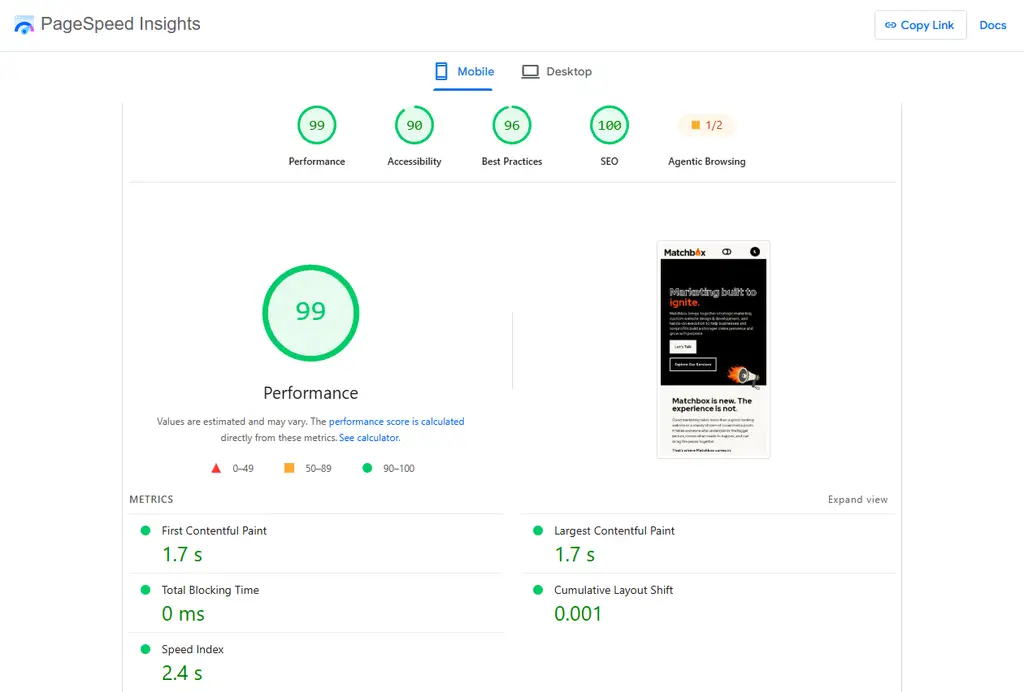
That didn’t happen by accident. It came down to a series of intentional decisions about hosting, images, fonts, design, code, and the tools I chose to build the site.
So why does this matter to your business?
Because your website has a job to do. It needs to communicate what you offer, build trust, and make it easy for someone to take the next step. If your website is slow, visitors may leave before they ever get the chance to see what you do.
And while website speed isn’t the only factor that influences your visibility on Google, performance and user experience matter. Let’s look at what that means and what I did to get my own site running quickly.
First, what does your PageSpeed score actually mean?
If you’ve never used Google PageSpeed Insights, it’s a free tool that analyzes your website’s performance and recommends improvements. You can test your website on both mobile and desktop devices. Each receives a performance score from 0 to 100. Here’s the general breakdown:
- 90–100: Good
- 50–89: Needs improvement
- 0–49: Poor
The score is useful, but it’s important to understand that it isn’t the whole story. PageSpeed Insights also evaluates several performance metrics that help explain how visitors experience your website.
One of the most important is Largest Contentful Paint (LCP).
What is Largest Contentful Paint?
LCP measures how long it takes for the largest visible piece of content on your page to appear. That might be your main headline, a large image, or another prominent element.
Think about visiting a website and seeing a blank screen or a loading indicator before the actual content appears. LCP helps measure how long that experience lasts.
Google recommends an LCP of 2.5 seconds or less for a good user experience.
Other important metrics include:
- Interaction to Next Paint (INP): How quickly your website responds when someone clicks, taps, or interacts with it.
- Cumulative Layout Shift (CLS): How much the content unexpectedly moves around while the page loads or as someone uses it.
Together, these are known as Core Web Vitals. They help measure whether a website not only loads quickly, but also responds smoothly and behaves as expected.
Why I pay particular attention to mobile performance
Your website might look and perform beautifully on a desktop computer, but that doesn’t mean it will deliver the same experience on a phone. Mobile devices can have slower connections and less processing power than desktop computers. Images, animations, scripts, and other website elements can take longer to load and process. That’s why I pay close attention to the mobile score. It’s often the more challenging environment to optimize for, and it’s an important experience to get right.
What I did to get my website to 99
There isn’t one magic plugin or setting that makes a website fast. Performance comes from how the entire website is built. Here are some of the decisions I made when developing the Matchbox website.
1. Started with quality hosting
My website is hosted on Elementor Hosting, a managed WordPress hosting platform.
Hosting plays a bigger role in website performance than many business owners realize. Your website’s files need to be stored somewhere, and the server hosting those files has to deliver them to visitors when they arrive. Managed WordPress hosting can provide performance features such as server-side caching, which helps deliver ready-to-serve pages rather than rebuilding them from scratch for every visit.
The important takeaway? Don’t treat hosting as an afterthought. A well-designed website still needs a solid hosting foundation.
2. Optimized every image
Images are one of the easiest ways to add unnecessary weight to a website.
A large photograph uploaded straight from a phone or camera can be several megabytes. Multiply that across a page with multiple images, and you’ve created a lot of work for a visitor’s browser.
For Matchbox, I made several intentional choices:
- Resized images before uploading them.
- Used WebP image formats to reduce file sizes.
- Set appropriate image dimensions within Elementor.
- Used image optimization to help keep files lightweight.
The goal isn’t to eliminate beautiful imagery. It’s to make sure every image is doing its job without making the website unnecessarily heavy.
3. Kept fonts under control
Typography is a big part of the Matchbox brand, but fonts can add to the amount of information a browser needs to download.
I use three font families and only load the weights needed for the design. It would be easy to load every available font style and weight, but there is no reason to make a visitor’s browser download files the website never uses.
Small decisions like this add up.
4. Used CSS instead of animation plugins
The Matchbox website includes several small visual details: buttons that fill with color when hovered over, service panels that light up, outlined headlines, and a scrolling animation that resembles a burning fuse.
Those effects are built with CSS, the code that controls how a website looks and behaves.
I didn’t need a separate animation plugin or a large animation library to create them.
This is one of the things I enjoy about website development. Sometimes the best solution isn’t adding another tool. It’s understanding how to accomplish the same thing with less.
5. Kept plugins to a minimum
WordPress plugins are useful. They add functionality without requiring you to build everything from scratch.
But every plugin has the potential to introduce additional code, scripts, styles, or other resources that affect performance. For Matchbox, I kept the setup relatively lean:
- Elementor and Elementor Pro for website design and development.
- Image Optimization by Elementor for image optimization.
- Yoast SEO for search engine optimization basics.
I also used Elementor’s built-in menu rather than adding a separate popup menu plugin. Before installing a plugin, I like to ask one question: Do I actually need another plugin to do this?
Sometimes the answer is yes. Other times, a simpler solution is already available.
6. Made intentional design choices
One of my favorite parts of building the Matchbox website was finding ways to make it visually interesting without relying on heavy design elements.
You’ll notice that I use bold, solid-color sections instead of large background photographs throughout the site. There are no image sliders, autoplay videos, or unnecessary popups. The design is still expressive, but the choices are intentional. A website doesn’t need to be packed with effects to make an impression. Good typography, thoughtful layouts, strong contrast, and purposeful interactions can do a lot of the heavy lifting.
What I’d avoid when building a business website
When I’m developing a website, I’m always thinking about the experience from the visitor’s perspective.
Some common things I’d avoid or carefully evaluate include:
- Oversized, unoptimized images: Especially photographs uploaded directly from a phone or camera.
- Autoplay videos: They can add significant weight and aren’t always necessary.
- Image sliders: Multiple large images and scripts can create unnecessary loading work.
- Too many plugins: Especially when several tools are doing overlapping jobs.
- Unnecessary animations: Visual effects should serve a purpose, not just exist because they’re available.
- Multiple layers of page builders: Stacking tools and add-ons can introduce more complexity than the website needs.
None of these elements are automatically bad. There are situations where a slider, video, or plugin makes sense. The point is to make those decisions intentionally rather than adding features without considering their impact.
How to test your own website speed
You don’t have to be a developer to get a better understanding of your website’s performance.
Google makes it easy to run a free test.
Here’s how:
- Visit Google PageSpeed Insights.
- Enter your website URL.
- Select Analyze.
- Review your mobile performance score first.
- Scroll through the results to see which areas need attention.
Pay attention to the performance score, but don’t stop there. Look at the individual recommendations and Core Web Vitals metrics to understand what’s actually slowing your site down.
One important note: a single test is a snapshot under specific testing conditions. PageSpeed results can vary, and real-world visitor data may tell a different story. Use the results as a starting point, not a final verdict.
A fast website is part of a better website
Website performance isn’t something I consider an optional upgrade or an extra feature. It’s part of building a good website from the beginning.
At Matchbox, website design and development include a performance-minded approach alongside mobile-friendly layouts, SEO foundations, and thoughtful functionality.
Because your website shouldn’t just look good. It should work hard for your business.
Ready for a website that looks sharp and performs just as well? Let’s talk about building something better. Get in touch with Matchbox.